


Architettura del sistema
Dopo aver visto nella parte precedente le caratteristiche generali di un sistema intelligente di ricarica delle auto elettriche, con i vari elementi in gioco, in questo ultimo articolo della serie illustreremo una possibile implementazione basata su componenti FIWARE.
Componenti FIWARE
Il sistema si basa su diversi Generic Enablers FIWARE:
- Orion-LD Context Broker per la gestione del contesto
- IoT Agent per l'integrazione con le colonnine
- KeyRock per identity management
- Quantum Leap per la storicizzazione dei dati temporali
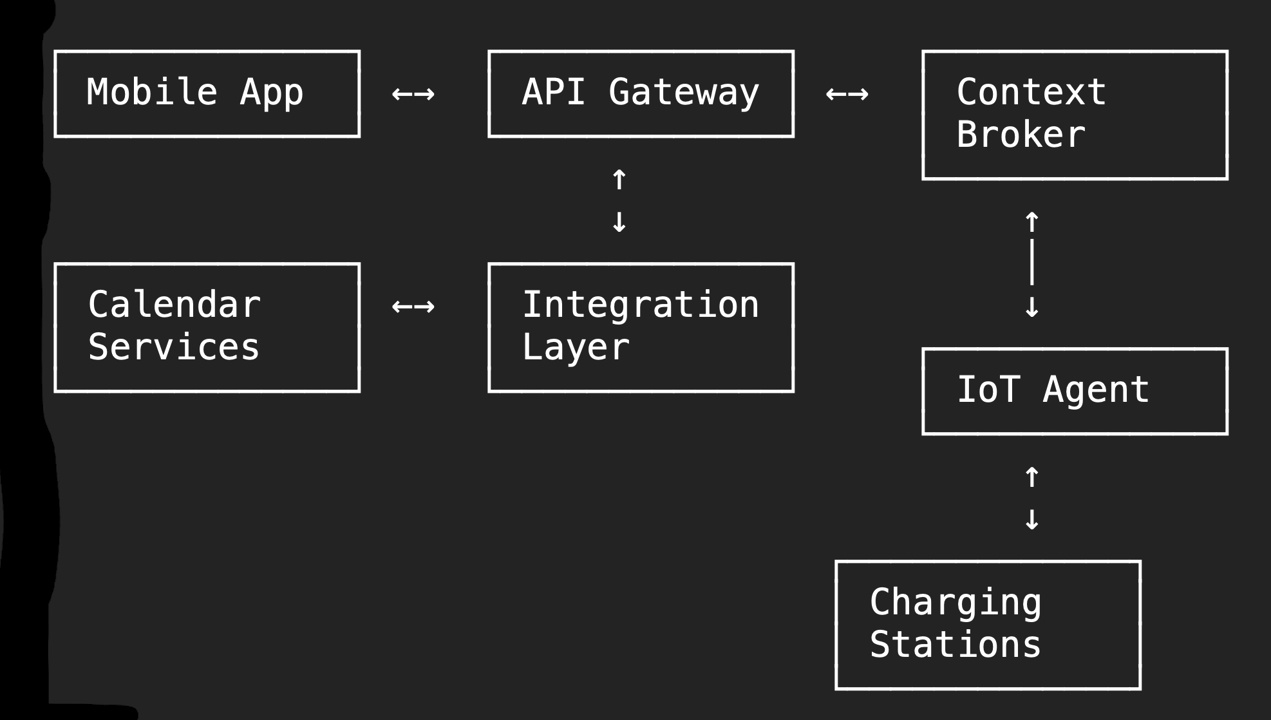
Implementazione dei Componenti Chiave
1. Modelli di Dati NGSI-LD
// Definizione delle interfacce TypeScript per i modelli NGSI-LD
interface EVChargingStation {
    id: string;
    type: 'EVChargingStation';
    location: GeoProperty;
    status: Property<'available' | 'occupied' | 'outOfService'>;
    connectorType: Property<string[]>;
    maxPower: Property<number>;
    currentPower: Property<number>;
    pricePerKWh: Property<number>;
    operator: Relationship;
    reservations: Property<Reservation[]>;
}

interface EVCharger {
    id: string;
    type: 'EVCharger';
    location: GeoProperty;
    batteryLevel: Property<number>;
    estimatedRange: Property<number>;
    preferredStations: Relationship[];
    owner: Relationship;
    lastUpdate: Property<Date>;
}
2. Backend Services
Servizio di Pianificazione Ricariche
from datetime import datetime, timedelta
from typing import List, Optional
import asyncio

class ChargingPlanner:
    def __init__(self, context_broker: ContextBroker):
        self.context_broker = context_broker
        self.optimization_service = OptimizationService()

    async def plan_daily_charging(self, user_id: str, date: datetime) -> ChargingPlan:
        # Recupera gli appuntamenti del giorno
        calendar_events = await self.get_calendar_events(user_id, date)

        # Recupera lo stato del veicolo
        vehicle = await self.get_vehicle_status(user_id)

        # Calcola il fabbisogno energetico
        energy_needs = self.calculate_energy_needs(
            current_charge=vehicle.battery_level,
            planned_routes=self.extract_routes(calendar_events)
        )

        if not energy_needs.requires_charging:
            return ChargingPlan(needed=False)

        # Trova le finestre temporali disponibili
        charging_windows = self.find_charging_windows(calendar_events)

        # Ottimizza il piano di ricarica
        optimal_plan = await self.optimization_service.optimize_charging(
            energy_needs=energy_needs,
            charging_windows=charging_windows,
            available_stations=await self.get_available_stations()
        )

        return optimal_plan

    def calculate_energy_needs(self, current_charge: float, planned_routes: List[Route]) -> EnergyNeeds:
        total_distance = sum(route.distance for route in planned_routes)
        estimated_consumption = self.estimate_consumption(
            total_distance,
            routes=planned_routes,
            weather=self.get_weather_forecast()
        )

        return EnergyNeeds(
            current_level=current_charge,
            required_energy=estimated_consumption,
            safety_margin=10.0  # percentuale
        )
Gestore delle Prenotazioni
class ReservationManager:
    def __init__(self, context_broker: ContextBroker):
        self.context_broker = context_broker

    async def create_reservation(self, request: ReservationRequest) -> Reservation:
        # Verifica disponibilità
        station = await self.context_broker.get_entity(request.station_id)
        if not self.is_slot_available(station, request.time_slot):
            raise SlotNotAvailableError()

        # Crea la prenotazione
        reservation = Reservation(
            id=generate_uuid(),
            station_id=request.station_id,
            user_id=request.user_id,
            time_slot=request.time_slot,
            status='confirmed'
        )

        # Aggiorna il Context Broker
        await self.context_broker.update_entity(
            entity_id=request.station_id,
            attrs={
                'reservations': {
                    'type': 'Property',
                    'value': [...station.reservations, reservation]
                }
            }
        )

        # Notifica l'utente
        await self.notify_user(request.user_id, reservation)

        return reservation
3. Implementazione iOS
Gestione del Calendario
class CalendarManager {
    private let eventStore = EKEventStore()

    func requestAccess() async throws -> Bool {
        return try await eventStore.requestAccess(to: .event)
    }

    func fetchEvents(for date: Date) async throws -> [EKEvent] {
        let calendar = Calendar.current
        let startDate = calendar.startOfDay(for: date)
        let endDate = calendar.date(byAdding: .day, value: 1, to: startDate)!

        let predicate = eventStore.predicateForEvents(
            withStart: startDate,
            end: endDate,
            calendars: nil
        )

        return eventStore.events(matching: predicate)
    }

    func analyzeEvents(_ events: [EKEvent]) -> [TripPlan] {
        return events.map { event in
            TripPlan(
                startTime: event.startDate,
                endTime: event.endDate,
                location: event.location,
                title: event.title
            )
        }
    }
}
Integrazione con FIWARE
class FIWAREClient {
    private let baseURL: URL
    private let session: URLSession

    func subscribeToUpdates() async throws {
        let subscription = NGSISubscription(
            entities: [EntityType.chargingStation],
            watchedAttributes: ["status", "currentPower"],
            notification: NotificationEndpoint(
                uri: "my-app-scheme://charging-update",
                accept: "application/json"
            )
        )

        try await createSubscription(subscription)
    }

    func updateVehicleStatus(_ status: VehicleStatus) async throws {
        let entity = NGSIEntity(
            id: "urn:ngsi-ld:Vehicle:\(status.vehicleId)",
            type: "Vehicle",
            attributes: [
                "batteryLevel": .property(status.batteryLevel),
                "location": .geoProperty(status.location),
                "lastUpdate": .property(Date())
            ]
        )

        try await updateEntity(entity)
    }
}
User Interface
class ChargingPlanViewController: UIViewController {
    private let mapView: MKMapView
    private let timelineView: TimelineView
    private let chargingManager: ChargingManager

    override func viewDidLoad() {
        super.viewDidLoad()
        setupViews()
        Task {
            await loadChargingPlan()
        }
    }

    private func loadChargingPlan() async {
        do {
            let plan = try await chargingManager.getDailyPlan()
            await MainActor.run {
                updateUI(with: plan)
            }
        } catch {
            await showError(error)
        }
    }

    private func updateUI(with plan: ChargingPlan) {
        // Aggiorna la mappa con le stazioni di ricarica
        mapView.showChargingStations(plan.stations)

        // Aggiorna la timeline con gli eventi e le ricariche pianificate
        timelineView.update(with: plan.schedule)

        // Aggiorna le informazioni di riepilogo
        updateSummaryView(plan.summary)
    }
}
4. Gestione della Privacy
class PrivacyManager {
    func filterCalendarData(_ events: [EKEvent]) -> [LocationTimeSlot] {
        return events.map { event in
            LocationTimeSlot(
                timeSlot: TimeSlot(start: event.startDate, end: event.endDate),
                location: anonymizeLocation(event.location),
                type: classifyEventType(event)
            )
        }
    }

    private func anonymizeLocation(_ location: EKStructuredLocation?) -> AnonymizedLocation {
        guard let location = location else { return .unknown }

        return AnonymizedLocation(
            coordinates: roundCoordinates(location.geoLocation),
            area: determineArea(location),
            type: classifyLocationType(location)
        )
    }
}
Testing e Monitoraggio
Unit Testing
class ChargingPlannerTests: XCTestCase {
    var planner: ChargingPlanner!
    var mockContextBroker: MockContextBroker!

    override func setUp() {
        mockContextBroker = MockContextBroker()
        planner = ChargingPlanner(contextBroker: mockContextBroker)
    }

    func testChargingPlanGeneration() async throws {
        // Setup test data
        let events = createTestCalendarEvents()
        let vehicleStatus = createTestVehicleStatus()

        // Execute
        let plan = try await planner.generatePlan(
            forEvents: events,
            vehicleStatus: vehicleStatus
        )

        // Verify
        XCTAssertNotNil(plan)
        XCTAssertTrue(plan.isValid)
        XCTAssertTrue(plan.meetsEnergyNeeds(vehicleStatus))
    }
}
Performance Monitoring
@contextlib.contextmanager
def monitor_performance(operation_name: str):
    start_time = time.time()
    try:
        yield
    finally:
        duration = time.time() - start_time
        prometheus_client.OPERATION_DURATION.labels(
            operation=operation_name
        ).observe(duration)
Conclusioni
L'implementazione dimostra come FIWARE possa essere utilizzato per creare un sistema complesso che integra dati da diverse fonti e coordina attività in tempo reale. L'architettura modulare permette di gestire le sfide tecniche mantenendo il sistema flessibile e scalabile.
La combinazione di un backend FIWARE robusto con un'applicazione mobile intuitiva crea un'esperienza utente fluida che nasconde la complessità sottostante del sistema. L'approccio adottato permette di estendere facilmente il sistema con nuove funzionalità e di adattarlo a diverse esigenze degli utenti.