

Introduzione
Per l'ennesima volta (i fedeli lettori di questa serie di articoli l'avranno ormai memorizzato) l'elaborazione che vogliamo realizzare utilizzando JMF è perfettamente modelizzata dallo schema illustrato nella Figura 1: l'input è il file audio/video in formato A, l'output è il file audio/video nel formato B:.
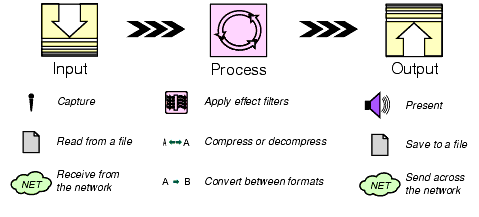
Supporremo ormai assodata la conoscenza degli oggetti di base di JMF, come il Processor, il DataSource o il DataSink e delle operazioni elementari ad essi connesse. Per chi desiderasse un approfondimento in tal senso può leggere gli articoli precedenti di questa serie.
Formati audio e video
I tipi di transcodifiche effettuabili sono di tre: audio, video, audio e video.
A seconda del tipo di transcodifica desiderata l'utente specificherà le informazioni relative ai formati audio e/o video.
Nel caso di transcodifica audio la prima cosa da fare è costruire un AudioFormat a partire dal formato audio richiesto. Di questo si occupa il metodo parseAudioFormat(String fmtStr). Un AudioFormat valido contiene le seguenti informazioni:
encoding (tipo di codifica);
sampleRate (sample rate);
sampleSizeInBits (numero di bit per campione);
channels (numero di canali)
endian (ordinamento big/little endian: AudioFormat.BIGENDIAN o AudioFormat.LITTLEENDIAN);
signed (indica se i campioni sono memorizzati in formato signed o unsigned: sarà true nel caso signed, false altrimenti);
Se questi attributi non sono forniti dall'utente, si assumono non specificati utilizzando il campo AudioFormat.NOT_SPECIFIED e resteranno gli stessi del file in ingesso.
Analogamente, nel caso di transcodifica video il metodo parseVideoFormat(String fmtStr) si occupa di generare un VideoFormat a partire dal formato video richiesto. Il VideoFormat può essere costruito in due modi: il più semplice prevede che gli sia passato il tipo di codifica (encoding), l'altro prevede invece che gli siano passati i seguenti parametri:
encoding (tipo di codifica);
size (dimensione di un video frame);
maxDataLength (lunghezza massima di un chunk);
dataType (tipo di dati, ad esempio byte array);
frameRate (il frame rate);
L'utente può specificare soltanto i primi due parametri. Pertanto maxDataLength e frameRare saranno VideoFormat.NOT_SPECIFIED, dataType sarà null, ovvero dopo la transcodifica questi attributi saranno gli stessi del file in ingesso.
L'algoritmo di transcodifica
L'algoritmo di transcodifica è costituito dai seguenti 10 passi:
Creare un Processor per la url di input specificata (corrispondente al file da transcodificare).
Configurare il Processor.
Analizzare il media locator di output (corrispondente alla url desiderata del file trancodificato) e basandosi sull'estensione del file, determinarne il tipo (content descriptor) dei dati (es.: .mov = QuickTime) usando MimeManager.
Settare il content descriptor sul Processor.
Per ogni traccia componente il media stream:
Confrontare il formato richiesto con i formati supportati.
Se c'è riscontro impostare tale formato.
Realizzare il Processor.
Ricavare il DataSource di output ed usarlo insieme con il media locator di output per creare un DataSink.
Startare il Processor e il DataSink.
Aspettare che il DataSink termini la scrittura del file.
Chiudere il Processor e il DataSink.
Dopo aver creato e configurato il Processor, utilizziamo un metodo per ricavare dall'estensione del file il content descriptor. Questo metodo, fileExtToCD(String name), utilizza MimeManager per ottenere il Mime Type e da esso il content descriptor:
String type = com.sun.media.MimeManager.getMimeType(ext);
FileTypeDescriptor ftp = new FileTypeDescriptor(ContentDescriptor.mimeTypeToPackageName(type));
Per completezza apriamo una parentesi per spiegare cos'è MIME. MIME (Multipart Internet Mail Extension) è un sistema di comunicazione pensato per permettere la spedizione tramite E-mail (e, per estensione, la circolazione sulla rete) di dati binari codificati in modo diverso, in modo che a ciascun flusso di dati venga associata una intestazione che specifica sostanzialmente il tipo di oggetto codificato (immagine, testo, programma...) e il formato con cui è stato memorizzato.
Molti tipi di trasmissioni di dati, tra cui la posta elettronica e il protocollo HTTP usato per il World Wide Web, prevedono quindi che il contenuto vero e proprio sia preceduto, all'interno delle righe di intestazione, da una indicazione del tipo
Content-type: oggetto/formato
dove al posto di oggetto vi è una parola chiave che specifica il tipo di oggetto (es. text, image...) e al posto di formato vi è una parola chiave che specifica il formato (ad esempio, se l'oggetto è un testo, plain, html...). Ogni coppia oggetto/formato costituisce un tipo MIME (MIME type o content-type).
Una volta ottenuto il content descriptor dell'uscita lo si imposta sul Processor. A questo scopo utilizziamo il metodo setContentDescriptor(Processor p, MediaLocator outML). Nel caso in cui il Processor non supportasse il tipo dell'uscita, settiamo il content descriptor a RAW e vediamo se invece lo supporta il DataSink.
A questo punto andiamo ad analizzare il formato delle tracce componenti il media stream. Il metodo setEachTrackFormat(Processor p, TrackControl tcs[], Format fmt) utilizzando il TrackControl ricavato dal Processor, controlla se il formato desiderato è tra quelli supportati e in questo caso lo imposta come formato della traccia:
TrackControl tcs[] = p.getTrackControls();
Format supported[];
Format f;
for (int i = 0; i < tcs.length; i++) {
supported = tcs[i].getSupportedFormats();
for (int j = 0; j < supported.length; j++) {
fmt.matches(supported[j]);
f=fmt.intersects(supported[j]);
tcs[i].setFormat(f);
}
Un'altra funzionalità che si può implementare è quella di decidere la "porzione" temporale del file che si vuole codificare. Ad esempio potremmo essere interessati ad una transcodifica dei primi 10 sec. di un video. Allora, una volta che l'utente abbia inserito gli estremi temporali di questo intervallo, dopo aver realizzato il Processor e creato il DataSink, andiamo a settare il media time e lo stop time del Processor:
int start = 0;
int end = 10;
p.setMediaTime(new Time((double)start));
p.setStopTime(new Time((double)end));
Non rimare ora che startare il Processor e il DataSink, aspettare che questo abbia terminato la scrittura su file e rilasciare le risorse.
Implementazione
Riportiamo di seguito, il codice che esegue la transcodifica audio/video. Per l'esecuzione corretta bisogna passare come argomenti la url del file in ingresso, quella del file in uscita e opzionalmente gli attributi delle codifiche audio e video, lo start time e l'end time:
java Transcode -o <output> -a <audio format> -v <video format> -s <start time> -e <end time> <input>
dove:
<audio format>: [encoding]:[rate]:[sizeInBits]:[channels]:[big|little]:[signed|unsigned]
<video format>: [encoding]:[widthXheight]
Esempio:
java Transcode -o file:/c:/video/prova.mov -a linear/8000 -v 320x240 -s 0 -e 10 file:/c:/movies/movie.avi
import java.awt.*;

import java.util.Vector;

import java.io.File;

import javax.media.*;

import javax.media.control.TrackControl;

import javax.media.Format;

import javax.media.format.*;

import javax.media.datasink.*;

import javax.media.protocol.*;

import javax.media.protocol.DataSource;

import java.io.IOException;

/**

* Programma per transcodifiche audio-video

*/

public class Transcode implements ControllerListener, DataSinkListener {

public boolean doIt(MediaLocator inML, MediaLocator outML, Format fmts[],

int start, int end) {

Processor p;

try {

System.err.println("Crezione del processor per " + inML);

p = Manager.createProcessor(inML);

} catch (Exception e) {

System.err.println("Impossibile creare il processor!" + e);

return false;

}

p.addControllerListener(this);

// Mettiamo il Processor nello stato configurato

p.configure();

if (!waitForState(p, p.Configured)) {

System.err.println("Configurazione del Processor fallita.");

return false;

}

// Settiamo il tipo di uscita del Processor

setContentDescriptor(p, outML);

// Settiamo il formato della traccia

if (!setTrackFormats(p, fmts))

return false;

// Realizziamo il Processor

p.realize();

if (!waitForState(p, p.Realized)) {

System.err.println("Realizzazione del Processor fallita.");

return false;

}

// Creiamo il DataSink

DataSink dsink;

if ((dsink = createDataSink(p, outML)) == null) {

System.err.println("Creazione del DataSink fallita per il

MediaLocator: " + outML);

return false;

}

dsink.addDataSinkListener(this);

fileDone = false;

// Settiamo l'istante iniziale del video da transcodificare

// se è stato impostato

if (start > 0)

p.setMediaTime(new Time((double)start));

// Settiamo l'istante finale del video da transcodificare

// se è stato impostato

if (end > 0)

p.setStopTime(new Time((double)end));

System.err.println("inizio transcodifica...");

try {

p.start();

dsink.start();

} catch (IOException e) {

System.err.println("IO error durante la transcodifica.");

return false;

}

// Attendiamo un EndOfStream event.

waitForFileDone();

// Rilasciamo le risore

try {

dsink.close();

} catch (Exception e) {}

p.removeControllerListener(this);

System.err.println("...transcodifica terminata.");

return true;

}

/**

* Settaggio dell tipo dell'uscita

*/

void setContentDescriptor(Processor p, MediaLocator outML) {

ContentDescriptor cd;

// Il file di output è di un tipo supportato

if ((cd = fileExtToCD(outML.getRemainder())) != null) {

System.err.println("Settato content descriptor a: " + cd);

if ((p.setContentDescriptor(cd)) == null) {

// Se il processor non supporta il tipo dell'uscita

// lo settiamo a RAW e vediamo se invece lo supporta

// il DataSink

p.setContentDescriptor(new

ContentDescriptor(ContentDescriptor.RAW));

}

}

}

/**

* Settaggio del formato delle tracce sul processor

*/

boolean setTrackFormats(Processor p, Format fmts[]) {

if (fmts.length == 0)

return true;

TrackControl tcs[];

if ((tcs = p.getTrackControls()) == null) {

// Il processor non supporta alcun controllo sulle tracce

System.err.println("Il processor non può transcodificare le

tracce nel formato richiesto");

return false;

}

for (int i = 0; i < fmts.length; i++) {

System.err.println("Settato formato di traccia: " + fmts[i]);

if (!setEachTrackFormat(p, tcs, fmts[i])) {

System.err.println("Impossibile transcodificare la

traccia nel formato: " + fmts[i]);

return false;

}

}

return true;

}

/**

* Cerchiamo tra tutte le traccie quelle compatibili col

* formato di transcodifica richiesto

*/

boolean setEachTrackFormat(Processor p, TrackControl tcs[], Format fmt) {

Format supported[];

Format f;

for (int i = 0; i < tcs.length; i++) {

supported = tcs[i].getSupportedFormats();

if (supported == null)

continue;

for (int j = 0; j < supported.length; j++) {

if (fmt.matches(supported[j]) &&

(f = fmt.intersects(supported[j])) != null

&& tcs[i].setFormat(f) != null) {

return true;

}

}

}

return false;

}

/**

* Creazione del DataSink

*/

DataSink createDataSink(Processor p, MediaLocator outML) {

DataSource ds;

if ((ds = p.getDataOutput()) == null) {

System.err.println("Il Processor non ha un DataSource di

output.");

return null;

}

DataSink dsink;

try {

System.err.println("DataSink creato per il MediaLocator: " +

outML);

dsink = Manager.createDataSink(ds, outML);

dsink.open();

} catch (Exception e) {

System.err.println("Impossibile creare il DataSink: " + e);

return null;

}

return dsink;

}

Object waitSync = new Object();

boolean stateTransitionOK = true;

/**

* Aspetta finché il Processor non è transitato nello stato desiderato.

* Ritorna false se la transizione è fallita.

*/

boolean waitForState(Processor p, int state) {

synchronized (waitSync) {

try {

while (p.getState() < state && stateTransitionOK)

waitSync.wait();

} catch (Exception e) {}

}

return stateTransitionOK;

}

/**

* Controller Listener.

*/

public void controllerUpdate(ControllerEvent evt) {

if (evt instanceof ConfigureCompleteEvent ||

evt instanceof RealizeCompleteEvent ||

evt instanceof PrefetchCompleteEvent) {

synchronized (waitSync) {

stateTransitionOK = true;

waitSync.notifyAll();

}

} else if (evt instanceof ResourceUnavailableEvent) {

synchronized (waitSync) {

stateTransitionOK = false;

waitSync.notifyAll();

}

} else if (evt instanceof EndOfMediaEvent) {

evt.getSourceController().close();

} else if (evt instanceof MediaTimeSetEvent) {

((MediaTimeSetEvent)evt).getMediaTime().getSeconds();

} else if (evt instanceof StopAtTimeEvent) {

((StopAtTimeEvent)evt).getMediaTime().getSeconds();

evt.getSourceController().close();

}

}

Object waitFileSync = new Object();

boolean fileDone = false;

boolean fileSuccess = true;

/**

* Aspetta finché non è terminata la scrittura del file.

*/

boolean waitForFileDone() {

System.err.print(" ");

synchronized (waitFileSync) {

try {

while (!fileDone) {

waitFileSync.wait(1000);

System.err.print(".");

}

} catch (Exception e) {}

}

System.err.println("");

return fileSuccess;

}

/**

* Gestore degli eventi del file writer.

*/

public void dataSinkUpdate(DataSinkEvent evt) {

if (evt instanceof EndOfStreamEvent) {

synchronized (waitFileSync) {

fileDone = true;

waitFileSync.notifyAll();

}

} else if (evt instanceof DataSinkErrorEvent) {

synchronized (waitFileSync) {

fileDone = true;

fileSuccess = false;

waitFileSync.notifyAll();

}

}

}

/**

* Converte il nome del file in un content type andando a parsificare

* l'estensione del file.

*/

ContentDescriptor fileExtToCD(String name) {

String ext;

int p;

// Estrae l'estensione del file

if ((p = name.lastIndexOf('.')) < 0)

return null;

ext = (name.substring(p + 1)).toLowerCase();

String type;

// Usiamo il MimeManager per ottenere il mime type dall'estensione

// del file

if ( ext.equals("mp3")) {

type = FileTypeDescriptor.MPEG_AUDIO;

} else {

if ((type = com.sun.media.MimeManager.getMimeType(ext)) ==

null)

return null;

type = ContentDescriptor.mimeTypeToPackageName(type);

}

return new FileTypeDescriptor(type);

}

/**

* Main program

*/

public static void main(String [] args) {

String inputURL = null, outputURL = null;

int mediaStart = -1, mediaEnd = -1;

Vector audFmt = new Vector(), vidFmt = new Vector();

if (args.length == 0)

prUsage();

// Parsifichiamo gli argomenti

int i = 0;

while (i < args.length) {

if (args[i].equals("-v")) {

i++;

if (i >= args.length)

prUsage();

vidFmt.addElement(args[i]);

} else if (args[i].equals("-a")) {

i++;

if (i >= args.length)

prUsage();

audFmt.addElement(args[i]);

} else if (args[i].equals("-o")) {

i++;

if (i >= args.length)

prUsage();

outputURL = args[i];

} else if (args[i].equals("-s")) {

i++;

if (i >= args.length)

prUsage();

Integer integer = Integer.valueOf(args[i]);

if (integer != null)

mediaStart = integer.intValue();

} else if (args[i].equals("-e")) {

i++;

if (i >= args.length)

prUsage();

Integer integer = Integer.valueOf(args[i]);

if (integer != null)

mediaEnd = integer.intValue();

} else {

inputURL = args[i];

}

i++;

}

if (inputURL == null) {

System.err.println("Non è stata specificata la url del file in

ingresso");

prUsage();

}

if (outputURL == null) {

System.err.println("Non è stata specificata la url del file in

uscita");

prUsage();

}

int j = 0;

Format fmts[] = new Format[audFmt.size() + vidFmt.size()];

Format fmt;

// Verifichiamo che il formato audio specificato esista

for (i = 0; i < audFmt.size(); i++) {

if ((fmt = parseAudioFormat((String)audFmt.elementAt(i))) ==

null) {

System.err.println("Il formato audio specificato non è

valido: " +

(String)audFmt.elementAt(i));

prUsage();

}

fmts[j++] = fmt;

}

// Verifichiamo che il formato audio specificato esista

for (i = 0; i < vidFmt.size(); i++) {

if ((fmt = parseVideoFormat((String)vidFmt.elementAt(i))) ==

null) {

System.err.println("Il formato video specificato non è

valido: "

+ (String)vidFmt.elementAt(i));

prUsage();

}

fmts[j++] = fmt;

}

// Creazionde dei media locator di input e output

MediaLocator iml, oml;

if ((iml = createMediaLocator(inputURL)) == null) {

System.err.println("Impossibile creare il Media Locator: " +

inputURL);

System.exit(0);

}

if ((oml = createMediaLocator(outputURL)) == null) {

System.err.println("Impossibile creare il Media Locator: " +

outputURL);

System.exit(0);

}

Transcode transcode = new Transcode();

if (!transcode.doIt(iml, oml, fmts, mediaStart, mediaEnd)) {

System.err.println("Transcodifica fallita!");

}

System.exit(0);

}

/**

* Create a media locator from the given string.

*/

static MediaLocator createMediaLocator(String url) {

MediaLocator ml;

if (url.indexOf(":") > 0 && (ml = new MediaLocator(url)) != null)

return ml;

if (url.startsWith(File.separator)) {

if ((ml = new MediaLocator("file:" + url)) != null)

return ml;

} else {

String file = "file:" + System.getProperty("user.dir") +

File.separator + url;

if ((ml = new MediaLocator(file)) != null)

return ml;

}

return null;

}

/**

* Analizza il formato audio specificato e genera un AudioFormat.

* Un formato audio valido ha la seguente forma:

* [encoding]:[rate]:[sizeInBits]:[channels]:[big|little]:[signed|unsigned]

*/

static Format parseAudioFormat(String fmtStr) {

int rate, bits, channels, endian, signed;

String encodeStr = null, rateStr = null,

bitsStr = null, channelsStr = null,

endianStr = null, signedStr = null;

// Analizza il media locator per estrarre il formato richiesto.

if (fmtStr != null && fmtStr.length() > 0) {

while (fmtStr.length() > 1 && fmtStr.charAt(0) == ':')

fmtStr = fmtStr.substring(1);

// Vediamo se è specificato il tipo di codifica (encoding)

int off = fmtStr.indexOf(':');

if (off == -1) {

if (!fmtStr.equals(""))

encodeStr = fmtStr;

} else {

encodeStr = fmtStr.substring(0, off);

fmtStr = fmtStr.substring(off + 1);

// Vediamo se è specificato il sample rate

off = fmtStr.indexOf(':');

if (off == -1) {

if (!fmtStr.equals(""))

rateStr = fmtStr;

} else {

rateStr = fmtStr.substring(0, off);

fmtStr = fmtStr.substring(off + 1);

// Vediamo se è specificato il numero di bit per

// [campione]

off = fmtStr.indexOf(':');

if (off == -1) {

if (!fmtStr.equals(""))

bitsStr = fmtStr;

} else {

bitsStr = fmtStr.substring(0, off);

fmtStr = fmtStr.substring(off + 1);

// Vediamo se è specificato il numero di

// canali

off = fmtStr.indexOf(':');

if (off == -1) {

if (!fmtStr.equals(""))

channelsStr = fmtStr;

} else {

channelsStr = fmtStr.substring(0, off);

fmtStr = fmtStr.substring(off + 1);

// Vediamo se è specificato l'endian

off = fmtStr.indexOf(':');

if (off == -1) {

if (!fmtStr.equals(""))

endianStr =

fmtStr.substring(off + 1);

} else {

endianStr = fmtStr.substring(0,

off);

if (!fmtStr.equals(""))

signedStr =

fmtStr.substring(off + 1);

}

}

}

}

}

}

// Sample Rate

rate = AudioFormat.NOT_SPECIFIED;

if (rateStr != null) {

try {

Integer integer = Integer.valueOf(rateStr);

if (integer != null)

rate = integer.intValue();

} catch (Throwable t) { }

}

// Sample Size

bits = AudioFormat.NOT_SPECIFIED;

if (bitsStr != null) {

try {

Integer integer = Integer.valueOf(bitsStr);

if (integer != null)

bits = integer.intValue();

} catch (Throwable t) { }

}

// # of channels

channels = AudioFormat.NOT_SPECIFIED;

if (channelsStr != null) {

try {

Integer integer = Integer.valueOf(channelsStr);

if (integer != null)

channels = integer.intValue();

} catch (Throwable t) { }

}

// Endian

endian = AudioFormat.NOT_SPECIFIED;

if (endianStr != null) {

if (endianStr.equalsIgnoreCase("big"))

endian = AudioFormat.BIG_ENDIAN;

else if (endianStr.equalsIgnoreCase("little"))

endian = AudioFormat.LITTLE_ENDIAN;

}

// Signed

signed = AudioFormat.NOT_SPECIFIED;

if (signedStr != null) {

if (signedStr.equalsIgnoreCase("signed"))

signed = AudioFormat.SIGNED;

else if (signedStr.equalsIgnoreCase("unsigned"))

signed = AudioFormat.UNSIGNED;

}

return new AudioFormat(encodeStr, rate, bits, channels, endian,

signed);

}

/**

* Analizza il formato video specificato e genera un VideoFormat.

* Un formato video valido ha la seguente forma:

* [encoding]:[widthXheight]

*/

static Format parseVideoFormat(String fmtStr) {

String encodeStr = null, sizeStr = null;

// Analizza il media locator per estrarre il formato richiesto.

if (fmtStr != null && fmtStr.length() > 0) {

while (fmtStr.length() > 1 && fmtStr.charAt(0) == ':')

fmtStr = fmtStr.substring(1);

// Vediamo se è specificato il tipo di codifica (encoding)

int off = fmtStr.indexOf(':');

if (off == -1) {

if (!fmtStr.equals(""))

encodeStr = fmtStr;

} else {

encodeStr = fmtStr.substring(0, off);

sizeStr = fmtStr.substring(off + 1);

}

}

if (encodeStr == null || encodeStr.equals(""))

prUsage();

if (sizeStr == null)

return new VideoFormat(encodeStr);

int width = 320, height = 240;

int off = sizeStr.indexOf('X');

if (off == -1)

off = sizeStr.indexOf('x');

if (off == -1) {

System.err.println("La dimensione del video non è

correttamente specificata: " + sizeStr);

prUsage();

} else {

String widthStr = sizeStr.substring(0, off);

String heightStr = sizeStr.substring(off + 1);

try {

Integer integer = Integer.valueOf(widthStr);

if (integer != null)

width = integer.intValue();

integer = Integer.valueOf(heightStr);

if (integer != null)

height = integer.intValue();

} catch (Throwable t) {

prUsage();

}

return new VideoFormat(encodeStr,

new Dimension(width, height),

VideoFormat.NOT_SPECIFIED, // maxDataLen

null, // data class

VideoFormat.NOT_SPECIFIED // FrameRate

);

}

return null;

}

static void prUsage() {

System.err.println("Usage: java Transcode -o <output> -a <audio

format> -v <video format> -s <start time> -e <end time> <input>");

System.err.println(" <output>: output URL o nome del file");

System.err.println(" <input>: input URL o nome del file");

System.err.println(" <audio format>:

[encoding]:[rate]:[sizeInBits]:[channels]:[big|lit tle]:[signed|unsigned]");

System.err.println(" <video format>:

[encoding]:[widthXheight]");

System.err.println(" <start time>: start time in secondi");

System.err.println(" <end time>: end time in secondi");

System.exit(0);

}

}
Conclusioni
In questo articolo abbiamo visto come poter effettuare transcodifiche di formato sia per audio e video, per porzioni di file o file interi.
Nonostante esistano un numero impressionante di software, anche free, che eseguono operazioni di questo tipo, è sicuramente utile e talvolta performante utilizzare delle librerie da poter inglobare nelle proprie applicazioni, senza dover lanciare programmi esterni e senza doversi preoccupare del sistema operativo e della piattaforma che si utilizzano.
Bibliografia
- [1] "*JMF API Specification*", java.sun.com/products/java-media/jmf/index.jsp